The internet is a constantly evolving ecosystem, and
browser
tools
like
Chrome
extensions
have become essential for users looking to streamline their online activities. One top
Chrome extension
that has proven to be extremely useful is the Custom UserAgent String extension. With an impressive aggregate rating of 4.03 out of 5, it's clear this chrome extension development tool has garnered a lot of positive user feedback.
Standout Features of the Custom UserAgent String Extension
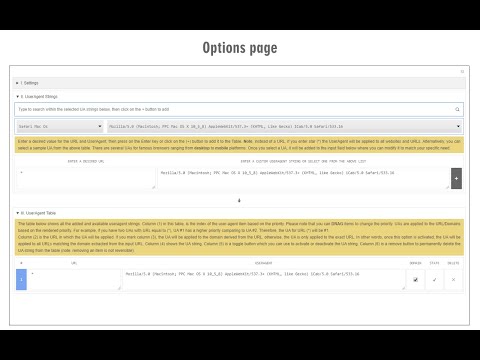
The Custom UserAgent String Chrome extension boasts a wide array of features designed to give users complete control over their browsing experience. Notably, it allows users to add a custom user-agent string for each URL or domain. This is incredibly useful for developing websites, as it aids in testing how a site will look and operate on different platforms.
Additionally, this browser tool includes an ON or OFF switch button conveniently located in the toolbar popup, and the option to change each URL to a domain directly from the options page. These
utilities
make the extension user-friendly and straightforward—qualities that are reflected in the high user ratings and reviews.
Users have praised this chrome extension for its ability to easily customize the user-agent string, a feature that has come in handy in various scenarios. Allan Carhart, for example, appreciated being able to "tell Google-owned websites that you're using Chrome even if you're using another Chromium-based browser." This effectively eliminates the recurring prompt to switch to Chrome when visiting Google sites.
Others, like Sathvik Malgikar, have employed the extension's features for more specific purposes, such as enabling YouTube TV on a PC from Chrome to play from phones. This flexibility and adaptability are key reasons why the Custom UserAgent String extension is considered one of the top Chrome extensions.
Despite some minor issues that users have raised—such as the need for an update on Chrome and the absence of a "Backup" or "Export Settings" function—the overall consensus is that the Custom UserAgent String extension is an effective and useful tool for browser users.
Whether you're looking to develop websites or simply want more control over your browsing experience, this chrome extension comes highly recommended. With its user-friendly interface, diverse array of utilities, and high aggregate rating, it's no surprise that the Custom UserAgent String extension is a popular choice among top Chrome extensions.















12 Reviews For This Extension
Does NOT work, what is wrong here
does not work. waste of time
It's work, many thanks
It's great to have control over some of the passive information being sent to websites. Here is just one of the many use cases: If you open a Google-owned website using anything besides Chrome, they shove an obnoxious message in your face about switching to Chrome. Even if you're using Chromium, which is literally the same code, they still tell you to switch. There is no "do not show again" button or any way to turn it off AFAIK. This Custom User-Agent string makes it easy to tell Google-owned websites that you're using Chrome even if you're using another Chromium-based browser thus shutting off the obnoxious message. Reply
Satisfied. It did what I was looking for. <3
Need an update soon on chrome because the extension doesn't work anymore
i needed something like this for a long time. i used this to enable Youtube TV on pc from chrome, to play from phones
to set user agent per site is what I was looking for. but pls add some description how do I fill the URL field. I guess one should enter url prefix following with the star. dunno if I can use the star anywhere in the string. pls clarify right there in the options
Thanks to this I can finally cast YouTube to my PC again!
I did not find the "Backup" or "Export Settings" function, I hope to add it, which will greatly enhance its convenience, thank you
good extension. but it not support any wildcard. like `image*.com`
Unable to post comments on any YouTube videos. With this extension installed and enabled. Disabled it, YouTube comments work perfectly fine...hmmmmm.